The Value of Productivity Advice

Does the source determine the value?

An interesting discussion popped up on Google+ today talking about evaluating productivity advice based on the provider of the advice over the advice itself.  While I may be over-simplifying the concept, it inspired me enough that I believe it is worth further investigation.  I do agree with the commenter there is a segment of the “productivity movement” tending towards saleable advice, but that is to be expected in any venue of expertise.  I spend a great deal of time in the project management space and you find the same perspectives there.  The challenge I raise to this is, do we discount productivity advice based on if we do not agree with the adviser?
My stance, and what I recommend to others, is to take a three-pronged approach to evaluate productivity advice.  The three tenets of the evaluation are:

Relevance – Practicality – Repeatability

By using these measures you can determine if a productivity hack, solution, tool, or whatever has a good chance of contributing positively to your personal productivity for an extended period of time.

Relevance

Does the advice have a relevant point of reference in making an impact in your daily life?  When you review your list of “productivity issues” do you see one that matches the solution the advice recommends, or do you see the solution and look for a problem for it to solve?  I’ll use the example of Inbox Zero for my own reference here.  While the approach of having all email addressed and resolved in a timely manner can be a huge boon to many, it’s relevance to my own needs is minimal.  Seeing the posts and solutions (some excellent by the way) I moved to see if implementing Inbox Zero methodologies made sense.  For me, the end result was additional work with no increase in productivity.  Not a failing of the solution, or of my own, but a failing of relevance.  I was solving a problem that for me didn’t need to be solved.

Practicality

Can you execute the advice without creating an adverse increase in your work efforts?  Many systems are complex and comprehensive, promising grand repositioning and resolution to many productivity needs and problems.  They require commitment and application for their success, and their failure comes not from the system but from the application.  For example let’s look at the popular approach by David Allen, Getting Things Done.  There are a huge number of advocates of this solution and just as many people who have successfully implemented it into their daily lives.  When I applied my own evaluation criteria to the approach (after several attempts to make it work for me) I found the effort needed to implement the solution was never going to be practical for me.  Again, it is not a failing in the solution nor is it a failing in myself, but rather a recognition that my personal needs and style required a different solution.

Repeatability

Can the advice become a repeatable contributor to your daily productivity methodology?  We have all fallen prey to the instance of the “hot hack.”  The simple, quick trick that promises to solve a productivity issue in short order.  The challenge often comes from these hacks not being truly sustainable over the long term.  An example of this for me became the “shared solution.”  Many methodologies recommend improving your productivity by engaging others in your system.  Shared notebooks, shared notes, shared tasks, shared lists, etc.  The thinking is by engaging another in your process, you lessen the direct load on yourself and thereby become more productive.  Personally, I’ve found this to be true IF (and that’s one really big if) the person or persons being engaged to share your same vision of the solution and a common willingness to participate.  In the professional space, the org chart can be used as the stick to reinforce the use of a shared solution, but in the personal space, there is rarely such an incentive.  You may be able to get a person to participate once, but making that success repeatable to multiple individuals and instances is a different matter entirely.

Evaluate based on what not who

Anyone can recommend a productivity solution, hack, or idea to me and I will evaluate it for myself based on the criteria listed above.  Who that recommender is bears no impact on my evaluation.  What is most interesting about this is many of the ideas I have adopted over the years have come from posts online, from people I have never heard of, but whose ideas whether their own or shared from another, have met the requirements and made a difference for me.  I will admit if a person’s repeated advice fails my test I’m much less likely to pay attention in the future.  So as I started this missive, let me recommend you evaluate what you see and read and determine for yourself what will work.

Managing tasks – for who for what?

When is a task not a task?

In the world of productivity there’s always a running debate around task management. Should they have reminders? Do they get scheduled? How do you track them? How do you follow-up? Before delving into that type of discussion let’s focus on helping define exactly what tasks are to you and how you can get a grip on them.

The term “task” is a loaded one in my dictionary, because it immediately conjures the image of something hard, something that needs to be “managed,” and something that needs a “manager.” Let’s change the definition a little and see if that helps grant us a better perspective. Instead of a task being focused on work to expend, let’s focus it on objective to be accomplished. Each task we complete should be an accomplishment, no matter how minor. (You have no idea how often completing the task of “getting my morning coffee” is the biggest accomplishment of the day. Now, with our new outlook on tasks, we can change even more rules.

When we look at tasks there are really two types in my book: tasks you assign yourself and tasks assigned to you by someone else. The biggest difference is the second type, assigned by someone else, involves just that…someone else. Part of the task accomplishment process then has to include the other person in the mix to be considered an accomplishment when complete. Let’s take a closer look at a basic userflow (one of my favorite terms) for the two types of task:

Task A – Assigned by me

Identify the task –> Document the task –> Plan –> Execute –> Document accomplishment

Task B – Assigned by someone else

Receive assignment –> Review assignment –> Acknowledge assignment –> Capture the task –> Document the task –> Plan –> Execute –> Document –> Report accomplishment –> Confirm or review accomplishment

If you are in a situation where a task takes longer than planned, you add in a loop for “Report Status –>” after Execute and go back to Execute to continue working. See how much more complicated things get when we introduce another human in the equation? This is where so many of our “task management” solutions fall apart. As professionals, we strive to find the one system, the one miracle pill, to address both Tasks A and B. They’re a rare beast by any measure. So how do we do this? There has to be a way. My opinion…it all comes from a change in perspective.

Communication vs. completion

Let’s take Task B from earlier since it’s the complicated one and break it down into two main areas: action and sharing.

Receive assignment –> Review assignment –> Acknowledge assignment –> Capture the task –> Document the task –> Plan –> Execute –> Document –> Report accomplishment –> Confirm or review accomplishment

Interesting change in what the task effort looks like, isn’t it? Out of the 10 steps to carry out the task, only two focus on the “doing” of the task. The rest are either receiving, sharing, or documenting (for future sharing.) When we look at our tasks this way, we can see putting energy into the task itself is not where the bulk of the work is derived. The heavy lifting comes from the communication back and forth to keep both parties engaged. Now this is just if you’re working with one person on a task. Think about what happens when we add two, three, or more.

Creating the stages in a solution for managing tasks from others must include steps to close the loop on the communications. Updates, snapshots, etc. are all part of the accomplishment of the task, but for more than just the “doing.” If you are going to establish a reputation for being the type of person who gets things done, others have to know you are doing just that. It’s up to you as part of your solution to make sure information about the successes are getting back to the right people in a timely manner so your reputation for quality work grows, rather than just becoming the person who can really crank out the widgets.

When you’re designing your “task management solution” always keep this in mind; the work you do is only a fraction of the work you share.

Task Management and Scheduling using Springpad

In productivity circles the process of task management has been hashed over and over again.  Whether you are using cloud based solutions, large enterprise tools, or personal constructs, everyone at one time or another has had to deal with the process of capturing tasks, tracking, executing, and reporting on them.


Since I’m such a fan of the Springpad platform (yes, I call it a platform because it is just that flexible) I thought I’d take a long standing technique for managing tasks related to time and translate it into the world of Springpad notebooks and springs.  The method:  Merlin Mann’s 43 Folders.  


In a nutshell, 43 Folders focuses on using a tickler methodology for managing tasks and actions.  There are 31 folders – one for each day of the month, and 12 additional folders, one for each month in the year.  As you move through your day and identify things needing to be addressed you capture the item on a note and place it into the corresponding folder for when the “tickle” will be most effective.  For example, if you have a bill due on the 15th you place the bill in the folder for the 12th and deal with it then.


In cases where you have something for a future month you just place it in the month folder and when that month comes around you transfer the contents from the month folder into the corresponding day folders.  Simple enough.


My Springpad Implementation


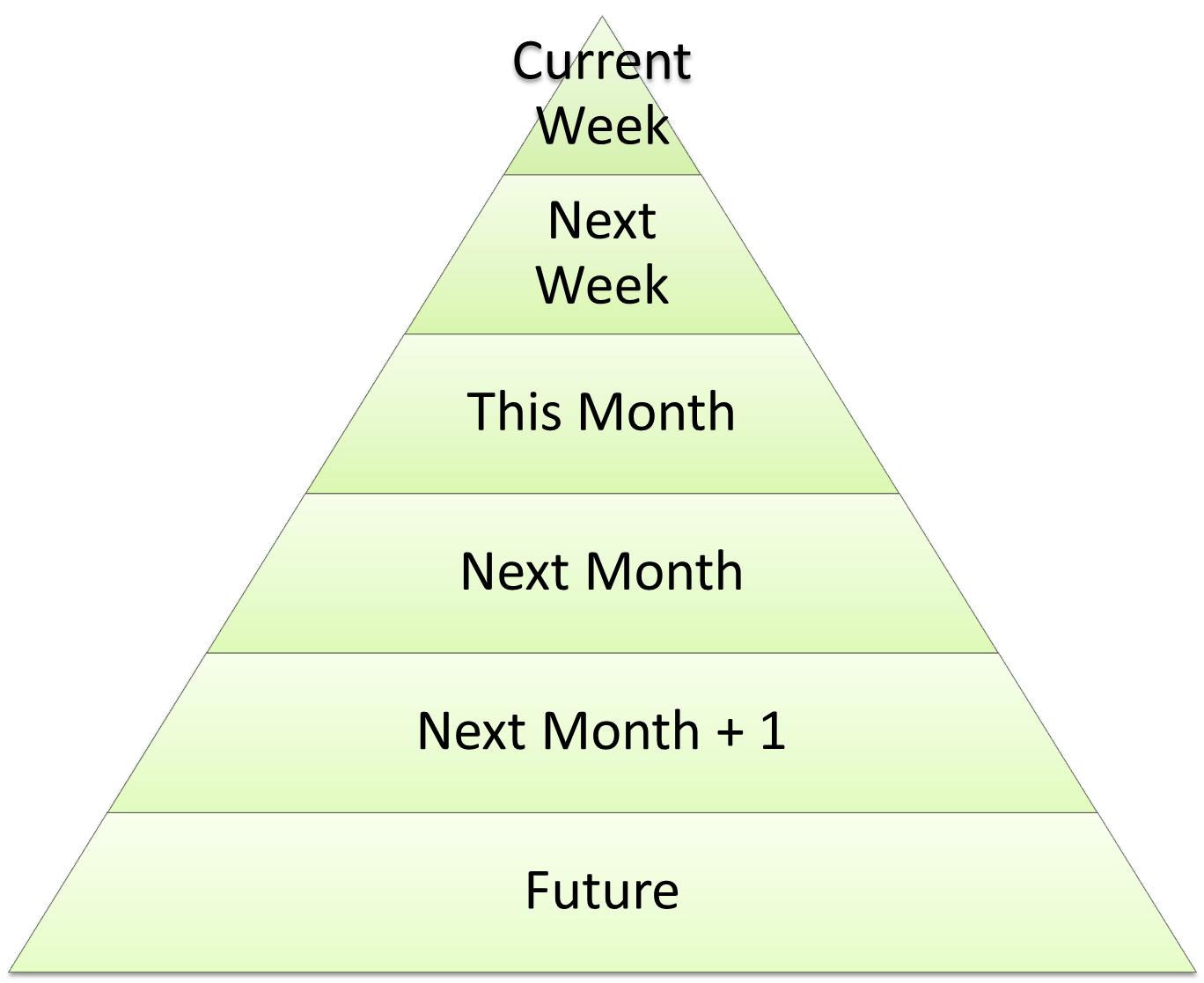
Now I’m never one to leave well enough alone so I made some changes to the 43 Folders model.  First, I reduced the number of folders down to six.  In this way I could address items in the same way I currently work.  The folders are:

Now the folders for the months are actually named with the month, but for the purpose of this graphic it was important to show you have three months of coverage before jumping out to the “future.”  This also gives you an idea as to the volume of content in each folder that would be reasonable.  Remember, you are trying to focus on what you can get done right now and not lose track of what is to be done in the future.

In Springpad, I equate folders with notebooks.  So in my Springpad view you get:

Idea Pump Tip:  I move all the task folders to the top of my listing of notebooks so that they show up right away regardless as to if I am using the web or my Android device.  

Capturing a task into the notebooks

Springpad has a built-in spring format for tasks and by using that combined with the notebooks and tags you get this:

The important thing is to note the Notebooks and Tags that have been assigned (tags are first under the horizontal rule, notebooks are second.)

Starting with the notebooks, and since this example is for work rather than personal, you can see I have two notebooks assigned:  Current Week and CorasWorks.  Current Week is the notebook of everything expected of me this week and CorasWorks is the name of the company for my day job.  Now what is important about this is that I assigned both.

Springpad allows you to add items to multiple notebooks and remove them from one without removing them from the others.  In this case my task exists in the Current Week (expectations) folder as well as my CorasWorks (work history) folder.  Where the strength of the system comes from is when I complete the task this week.  Once the task is finished, I mark it complete using the checkbox, add any notes I need into the Activity field, and remove the Current Week notebook connection.  By dropping the current week notebook I still have a record of my task in the Company notebook while keeping my Current Week notebook clean.

This technique works just as well for non-task items that need to be “scheduled”.  I frequently add shows to watch or things to read into my notebooks so I make a point of getting to them.  If an item is for the future reference, just mark it with the correct notebook and when you do your scheduled reviews move the items from one notebook to another.

Idea Pump Tip:  When emailing items into Springpad, you can attach more than one notebook parameter to the subject line.  If I have an email needing to be addressed this week and I’m in a hurry, I’ll forward it to my Springpad email address and append @CurrentWeek and @CorasWorks to the subject line.  


Using the Springpad notebooks as a top level of organization for your content gives you flexibility and structure at the same time.  Try it and see if this process works for you.  Comments, questions and feedback are welcome and if you find this useful, please share it on your social networks.

Thanks from the Idea Pump!

To G+ Blog or not to G+ Blog – a matter of balance


ant0720 / Foter / CC BY-NC

There’s an interesting debate going on about using Google+ as a primary blogging platform over systems such as Blogger and WordPress.  As is normally the case there are people on each side of the discussion, with some advocating complete migration to G+ while others claim there is no place for G+ when it comes to blogging.  My response is simple…I take the middle road.  Here are my reasons:

Commenting is better with G+


The ability to hook WordPress or Blogger into the commenting system for Google+ opens  a world of connection and response that honestly I never get through my normal blogging channels.  It’s a simple enough matter to make the connection and once it’s done G+ becomes the social connection for your posts.

Writing is more thoughtful (for me) in a blogging tool


I find that the stream of consciousness type of environment that G+ doesn’t put me in the right mindset to write and edit posts that take longer than top of mind.  While I do know I could do my writing in another tool then copy and paste but that seems to defeat the purpose.  Also the complexity of trying to do draft posts in G+ pushes me again back into a true blogging platform.

Sharing is better in G+


After spending time crafting a post I want the broadest audience possible to read it, but I also want the most engaged group to participate in it as well.  The posting of links not only to Communities but the Public as well through G+ gives me that reach.  Once they read the post they can learn more through the navigation structure I manage on my blog rather than counting on G+ to navigate a reader to my other posts.

Ownership of content is easier on a blogging platform


Writing takes effort and not ashamedly I want to be able to show what I have written and the expertise I have in various fields and that is easier to accomplish through a medium that can cross social networks and be used where it is best at that time.

The focus should be the audience and the message, not the medium


I want to be able to leverage every possible way to share and communicate with my readership base.  I’d rather keep my options open and leverage the platforms for their strengths as they grow and change.

Moving day again

It seems the short attention span I suffer from when it comes to blog hosting services has struck again.  In my on-going quest to find the one service providing me not only an effective tool but tight integration with my social networks I have returned to Blogger yet again.

There is a debate going on as to whether it is better to blog directly on Google+ or to blog outside and post your content for comment.  For the rest of the month I’ll do both and let the chips fall where they may.

Blogger and Google+ = A Strong Combination

One of the things I have noticed right away is the improvement in the Blogger system since the last time I used it.  They have come a long way in improving the user friendliness of the solution.  While it doesn’t have quite the flexibility of a WordPress or Joomla, it does have the ease of use plus power that puts it beyond options such as Tumblr in my mind.

I also noticed since I connected my Blogger account to my Google+ account, as soon as I post an article I immediately get the option to share the article on Google+.  It’s a convenience, but one I’m going to learn to count on for sure.